Archive

Posts Tagged ‘iPhone’

Create a Portable Document Scanner for your iPhone

February 22nd, 2010

Getting All of those Scraps into your Computer

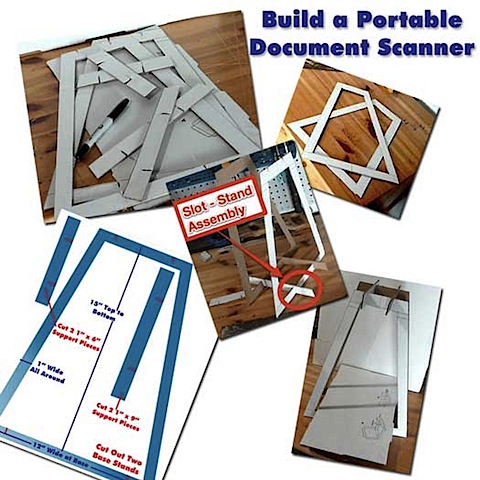
Overview: You will learn how to turn your iphone into a portable document scanner for free in under 15 minutes. This will all be done using one piece of cardboard, a ruler, a utility knife and a pencil.
build-portable-document-scanner.jpg

Getting Things Done With Creativity and Elbow Grease

Occasionally I need to get digital copies of papers into my home and/or work computers. I don’t feel like having two full-blown scanners wasting space on my desks, nor do I feel like buying them.

What’s my quick, free, space saving solution? Build a stand that allows me to use my iPhone to make quick images of documents.

I have a few simple requirements for this document scanner:

  1. Must be able to be assembled quickly and easily
  2. Muse capture 8.5″ x 11″ documents perfectly (no cropping)
  3. Must be able to be disassembled, and stored quickly and easily
  4. Must be cheap (better yet, FREE!)

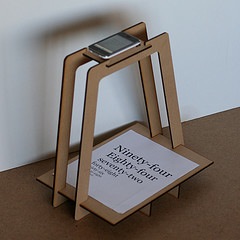
I searched for a few alternatives and found this really cool option by Kyle Koch.
kyle-koch-scanner-stand.jpeg

He sells them for $15 here. This is an awesome idea and $15 is very fair price. But what fun would that be? I decided to try to build my own for free.

This is my finished prototype:

portable-document-scanner.JPG


I place the document on the tray and the phone on the top supports with the camera application running. Then, I just press the “shoot” button and have a decent scan of the document. The key is to have the USB cable plugged in so that you can just grab them using the computer’s file manager. Also, the better the lighting, the happier you’ll be.

With a little bit of practice, I was able to get acceptable results on each documents first try.

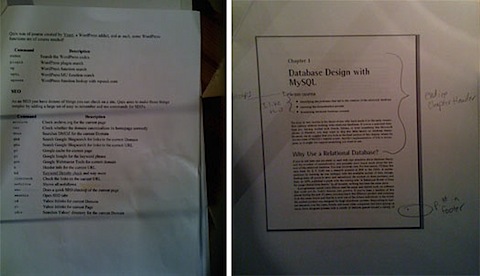
Here are some of the document scans that I produced: (scaled down for this article)
scanned-docs.jpg

Not bad for $0 and 20 minutes time.

Instructions for Building your iPhone Document Scanner

I know, you want to build yourself one of these handy gadgets, right? Well believe me, it’s very simple.

What you Will Need

Supplies: Utility Knife , Pencil, Ruler or Yardstick, piece of cardboard (15″ X 30″), scissor.

Instructions:

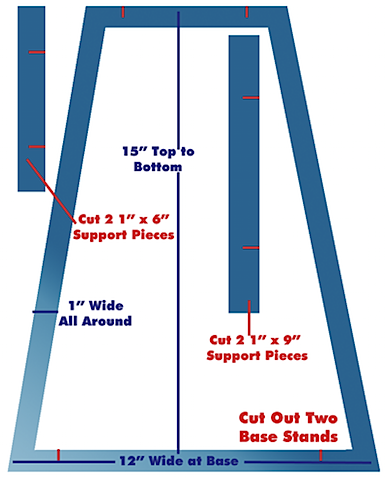
Print out and assemble the Templates diagram
instructions.png

Trace two Stand pieces on the cardboard

template2.jpg

Cut out the Stand pieces using the Yardstick and Utility Knife (be very careful)

template3.jpg

Trace and cut out the two Bottom Brackets

Trace and cut out the two Top Brackets

Cut the notches into the Stands and Braces as shown on the diagram
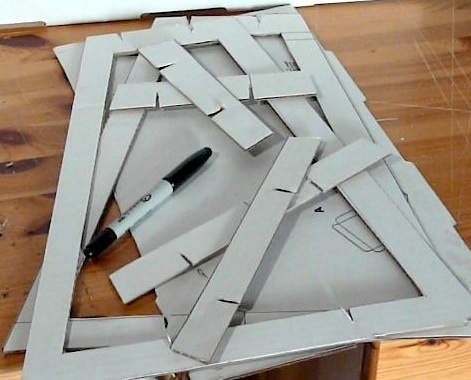
packed.jpg

Insert the notches on top and bottom to assemble the Stand

insert-slots.gif

Place the rectangular base into the stand
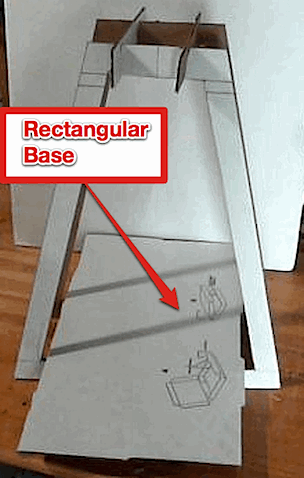
portable-document-scanner.gif

Place a document on the rectangular base
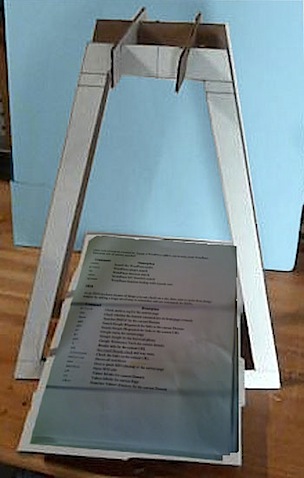
document-on-scanner.jpg

Turn the phone’s camera application on and place it on the top braces so that the document is in the picture

Take the picture.

scanned-docs.jpg

Portable Document Scanner Video Tutorial

The following video tutorial shows you how to perform all of the steps necessary to make your scanner.

Podcast, Productivity, Tutorials , , , ,

What I would Like to See in Tech for 2010 (That Probably Won’t Happen)

December 22nd, 2009

2010 Technology Wish List

2010-technology-wish-list.gif

2009 Was OK, But Things Can Get ALOT Better

2009 is almost over and I’m making my technology wish list for 2010. Being that it’s a “WISH” list, I decided to shoot for the stars. in order fro 2010 to be the best year ever in tech, here’s what I want.

iPhone – My Biggest Joy and Disappointment

The iPhone plays a huge role in my IT infrastructure. It bridge the gap between the VitaminCM global headquarters and the vast wastelands that lie outside my door. Sometimes I actually have to go out and mingle with the great unwashed hordes. Gasp! While there are so many things to love about my trusty companion, here is what I desperately wish for:

  • AT&T to get a decent network
  • Verizon to get the iPhone
  • Flash and JAVA support – It’s flippin’ 2010 already!
  • Support for a Bluetooth Keyboard (No, I don’t want to Jailbreak my phone.)
  • Front and back Video Cameras so I can gitz my Skype video conference on.

Read more…

Miscellaneous Ramblings , , , , , , , ,

Motorola Droid for Verizon Wireless – Product Review

November 8th, 2009

Another “iPhone Killer” is Not Ready for Prime Time

Motorola Droid Crying

It seems that the biggest kiss of death that could ever hit a mobile phone is “iPhone Killer”. My wife is a Verizon die hard and refuses to switch to AT&T to get an iPhone. With the much ballywhooed release of the Motorola Droid, we were both excited for her to actually get an awesome phone for herself. I told her on Saturday morning that I was taking her to the Verizon store to buy her a Motorola Droid. I know, I’m kind of an awesome husband.

Read more…

Play

Gadgets, Podcast, Product Reviews, Technology , , , , , , ,

Wordpress 2 – iPhone Application Review

October 29th, 2009

The perfect tool for bloggers on the go

I just downloaded the Wordpress 2 iPhone application. I had the previous version, but I never found it that useful. What a difference an upgrade makes!
The interface is actually very good. You can even write small posts (like this one) entirely on your phone.

Features

You can manage multiple blogs.
You can write, post, and read articles.
You can edit existing posts (title, tags, categories, text, and even images).
You can post photos and screen captures from your phone.

Reccomendation

If you need to write quick articles on the go, then this FREE handy iPhone app is definitely for you. Check it out!

Read more…

Gadgets, Product Reviews, Technology , , , ,

iPhone Photoshop Application Review

October 15th, 2009

Just What You Need to Make Your Pictures Pop

Photoshop iPhone Application

If you have ever taken pictures on your iPhone, you realize that they seldom turn out just right. A little off center, too dark, not vivid enough, whatever. Sure, you can sync them to your computer and edit them, then sync them back to your phone. If you have like 4,000 hours to kill. Well, Photoshop.com Mobile’s iPhone application is just what you need. You can take any picture on your iPhone and make quick, simple, effective edits in seconds just using your pointer finger.

Photoshop on your computer has millions of filters, effects, and features that are great for pros, but the Photoshop iPhone application has just what you need to clean up your phone pictures. Did I mention the price? That’s right, FREE!

Read more…

Play

Miscellaneous Ramblings, Podcast, Product Reviews, Technology , , , , , , , , , , , , , ,

DropBox for iPhone – Your Files Truly are Everywhere Now

October 4th, 2009

Awesome Desktop Application Moves to your Phone

Dropbox iPhone application

One of my favorite desktop applications of all time is Dropbox. Dropbox allows you to sync important files between multiple computers. You just install the software on your computers and set up a dropbox (folder) and place files in it. The files will instantly appear on all of your other computers.

Read more…

Play

Miscellaneous Ramblings, Podcast, Product Reviews, Technology , , , , ,

Music Services with the Best Third Party Integration

June 9th, 2009

The Best Music Services Part 5

Music Services Third Party Integration

This is the fifth article in a 5 part series on the Best Music Services on the Internet. See the rest of the series:

  1. The Most Reliable Online Music Services
  2. Online Music Services with the Best Suggestion Quality
  3. The Best Music Discovery Service
  4. Best Community Driven Online Music Services
  5. BBest Third Party Integration among Online Music Services

Even though you can do a lot from the home page of most internet music services, you need to be able to take the show on the road. When you can integrate your favorite music service into other third party sites and devices they become more powerful and useful.


I have a few standard ways that I will judge each service’s third party integration:

  • Plug-ins for your desktop music player (iTunes, Windows Media Player, etc.)
  • Integration with popular Social Networks (Facebook, MySpace, Twitter, etc.)
  • Standalone Application for your phone (iPhone, Blackberry, Windows Mobile, etc.)
  • Embeddable player for your web page


A service will need at least one check for each category for a “perfect” score.


Read more…

Miscellaneous Ramblings , , , , , ,

The BlackBerry Storm is Terrible

May 3rd, 2009

It Ain’t No BlackBerry and it Sure Ain’t No iPhone

BlackBerry Storm

This weekend my wife needed a new cell phone.  I’m on AT&T and using an iPhone. She’s on Verizon and will not consider changing. Since she likes my phone , but wants to stay on Verizon, the obvious answer is a BlackBerry Storm .

I was kind of excited because it would be cool to compare and contrast the iPhone and Storm.

Off to the Verizon store…

They actually had 3 working Storms to demo (nice!). She picked on up and started uncomfortably fiddling for a few minutes. All the while I’m hanging over her shoulder trying to help her find/do things. She was having such a terrible time of it and not mincing words. I just figured that it was all her.

Read more…

Gadgets, Miscellaneous Ramblings, Product Reviews, Technology , , , , , ,

Sync Files on Multiple Computers Using DropBox

April 5th, 2009

Always Have Your Important Files

sync files with dropboxDo you work on multiple computers during the day? Perhaps one at work and one at home? Maybe one is a Mac and another is a PC? Well there are a lot of files that you may create or update on one machine that you suddenly need on the other. Sure, you could use a USB drive, but that is very manual and error prone.
If you need to have a common collection of files that are synchronized and instantly available everywhere, you should use Dropbox – Secure online file sync
. DropBox is a service that allows you to sync files between multiple computers via their servers.

I have a few computers in my house: A windows desktop in my Office, Windows laptop downstairs, a Linux Laptop in our Bedroom (My Wife’s) and a new MacBook Pro where I do most of my writing now. I have some files on my old Windows desktop and laptop that I need on my MacBook and newly created files that I want back on my PCs. The other problem is that I need to work with certain Windows or Mac only apps at different times. This allows me to move all of the files that I need back and forth to the machine where I need to work in “real-time”.

If I do a Screencast on my PC, I just put it into my DropBox and upload it from my Mac when I’m ready. If I make something in iMovie on my Mac, I just drop it in and open it on my PC later.

What exactly is Dropbox?

This is how DropBox describes their service:

Dropbox is the easiest way to share and store your files online.
Works like you do
No complicated interface to learn. Dropbox runs in the background on your desktop.
Worry-free syncing
Sync your files automatically to your computers and the web.
It’s everywhere you are
Sign in and access your files from any browser or mobile device.
Easy sharing
Sharing files with your friends and family is just two clicks away.
Photos
View your photos in a gallery and share them easily with anyone.

Read more…

Play

Podcast, Product Reviews, Productivity, Software, Tutorials , , , , , , ,

iPhone Application Review – RunKeeper

March 24th, 2009

Use the GPS in your iPhone to Track Your Workouts

RunKeeper iPhone Application

Do you run, walk, bike, or ski? Then you’ve probably asked, “How far did I go today?” Well if you use RunKeeper on your iPhone, then you can track your distance, speed, time and more. This is all done using the GPS built into the phone right on the fly. What’s even better is that you can save all of your workouts online. You can go to the RunKeeper site using your free account and view mounds of data on all of your runs.

You will track the following performance statistics:

  • See how far you run, walk, and ride.
  • Track your speed, pace, and elevation.
  • Record and map your routes using GPS.
  • Share your fitness activities and progress with your friends!

Read more…

Miscellaneous Ramblings, Productivity , , , ,