
Writing a Blog Aritcle Using the WordPress Web Interface
Now that you have your WordPress Blog installed and configured, you are ready to start writing and publishing articles. WordPress has a web-based interface that allows you to write, edit, and publish articles to your blog.
Complete Productivity Series
Be the Most Productive You Possible
Over the last few weeks I have written several articles focused on productivity and organization tips. I thought it might be helpful to create a page that groups, explains, and links to them in an organized manner.
I separated the articles into three general categories:
- Collecting Information
- Scheduling Activities
- Productivity on the Go
Collecting Information
Processing, recording, recalling information is a critical part of being productive and organized. These articles cover effective ways to get a grip on all of the information in your life.
 How You can Take the Greatest Notes in the World
Taking good great notes is probably the best step to being more organized and productive. This article covers my personal technique for taking notes and using them to take action.
 Boost Your Creativity and Productivity by Using a Simple Notebook
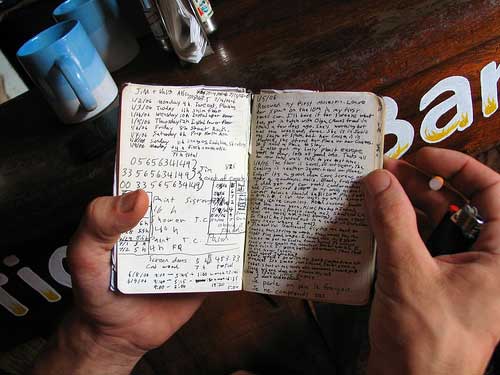
Trying to find ways to capture your creative bursts and brainstorms and use them effectively? One of the greatest tools ever invented is a humble notebook. Most of the creative, successful people that I see use notes as part of their creative process.
 Boost Google Reader’s Productivity
There are a million different sources of information on the web that you need to check every day. Using Google Reader is the best way that I know to take in and process mountains of information in a short amount of time. Check out my favorite tips on squeezing every last drop out of it.
 Never Forget Another Idea – Capture Everything with Evernote
If you want to take notes that you can use everywhere on any computer or phone, you need Evernote. This tutorial shows how to use Evernote on Windows, Mac, Linux, phones, and the web. This is one of my favorite productivity applications.
Scheduling Activities
After you capture everything you need, now it’s time to start putting it to work. You need a way to keep track of everything that needs to get done. Here are a few tips to help you get it together.
Get Things Done with RememberTheMilk
RememberTheMilk is my favorite web based task management tool. You can schedule, track, and manage all of your to do’s from the web or your phone. This is a life saver for the absent minded procrastinator. (I’m talking to you! and me.)
 Getting the Most Out of Mozilla Thunderbird
If you need a tool to handle Email, Contacts, and your Calendar, then give Mozilla’s Thunderbird a shot. I’ll show you how to stretch it beyond even Mozilla’s imagination with some of these extensions.
Productivity on the Go
None of us gets to sit down in an ideal office and handle everything that needs to be done. We’re all on the go these days. Well here are some great ways to take your show on the road without missing a beat.
 Create a RoboSecretary for Yourself with Dial2Do
This might be my favorite productivity tip in this series. Dial2Do allows you to take all of these productivity systems that I have covered and manage them from your phone. Dial the phone, say what you want done, and it just gets done. If you’re only going to read one article on this page, make it this one!
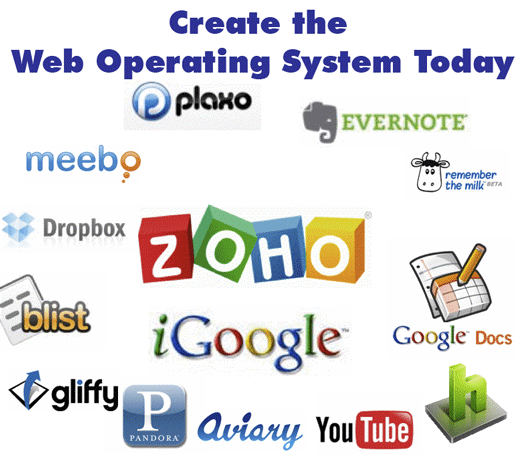 Create the Web Operating System Today
When you’re on the go, you never know what computer that you will be using. This article shows you how to put a full computing experience on the web and access it from any computer in the world.
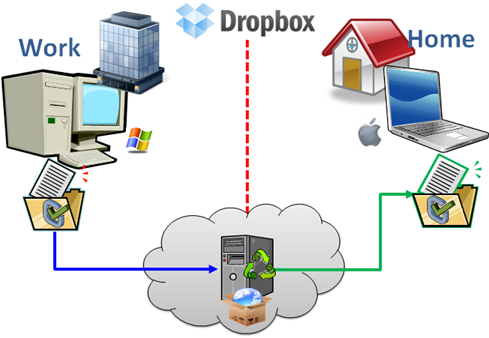 Sync Files on Multiple Computers Using DropBox
If you do use multiple computers (work, home, school) you need DrobBox. This will let you sync your most important files between multiple computers with ease. Take a look at this tutorial.
 Carry A Computer in your Pocket
If you insist on using desktop applications, then you should check out this article. You can load a bunch of your favorite applications on a USB drive and use them your way on any other computer.
What do you think?
If you have any other ideas or questions, please put them in the Comments below.
How You can Take the Greatest Notes in the World
Use this Simple Technique to Record, Organize, and Recall Everyting
The information age is upon us. Every day I take in or crank out so much information that it is very difficult to keep it all together. With all of the computers, PDAs, and voice recorders available, I rely on a plain old notebook as my main weapon in the battle to record, create, and organize information. Even though my notebook is simple, my method of taking notes is anything but. I’m going to show you a quick way to go take great notes that will keep you on top of everything.
My Approach to Taking Great Notes
I use a combination of a few approaches modified into my own special method. I base it mostly on the Cornell Note Taking method. Since I’m not a student, I adapted it for taking notes at business meetings and brainstorming projects.
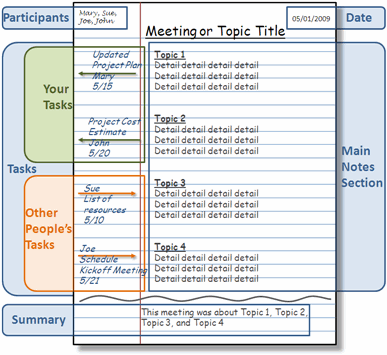
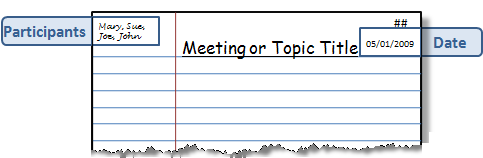
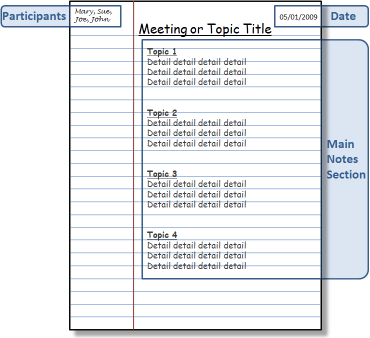
I start out with regular lined notebook paper. I break the page into four sections:
Top
Notes
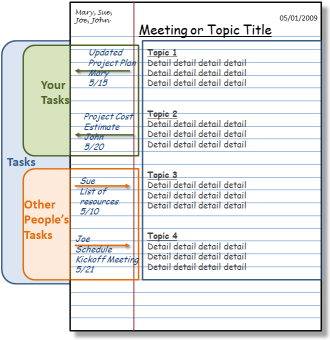
Action Items
Summary
Top Section
In Top the section I write the following:
Top Left – Attendee names (if it’s a meeting)
Top Center – Meeting or Project title
Top Right A – Page Number
Top Right B – Date
Notes Section
I use the main section of the page to taking notes or writing ideas and content.
Action Items
I use the left margin of the page for Action Items. These are typically To-Do’s or Open Questions. If there is a task for me, I draw an arrow pointing out of the Notes section (right to left). Then, I write the task name, recipient (if any), the due date. If it’s a task for someone else I draw an arrow pointing into the Notes section (left to right). Then, I write the responsible person’s name, the task name, recipient (if it’s not me), and the due date.
Summary Section
When the session is over I draw a wavy line below the Notes section. I write a brief one or two line summary at the bottom of the page.

After the Meeting
I also transfer my Action Items to my rolling To-Do list. There are many great ways to record your task list, I love RememberTheMilk. Here is a tutorial showing how use RememberTheMilk to manage your tasks.
Cataloging Notes
Having a notebook full of notes is not very helpful if you can’t find what you need. I always leave a few pages at the back each notebook to create an Index. When I’m done with a meeting I go to the back and write the Page Number, Topic, and Date. This creates a scannable Index that I can use to quickly find notes by topic or date.
Extra Credit
At a lot of meetings that I attend people write and draw important information on flip charts or white boards. At the end of these meetings I usually pull out my phone and grab a decent picture of the information. Then I upload the picture to my Evernote account. Then the picture is available back at my computer before I even get to my desk. Then I print it off and tape the page to the back of the notes from the meeting. Here is a tutorial showing how to use Evernote to capture information anywhere and recall it any time.
Conclusion
This whole process only adds a few seconds onto the basic note taking process, but provides great benefits down the road. When I need to recall something from a project meeting that happened a month ago I just open the Index, find my page and go to the notes. At a moment I can see who was there, when it happened, what was said, and who was responsible for what. That’s certainly worth 45 seconds after an hour long meeting in my opinion.
Here is an article that I wrote about the virtues of taking notes and some of the other cool things that you can do with them.
If you have any other good note taking ideas please add them in the comments section.
16 Best Places to Learn How to Do Things
My Favorite Places for Tutorials and Instruction

VitaminCM.com’s goal is to help people get more from their technology. I want to help and inspire people to do more fun and useful things with computers, the internet, and gadgets. This help is provided via detailed written and video tutorials along with News, Reviews, and Surveys.
I would like to share several invaluable resources that I use for information, instruction, inspiration, and tips of my own. This is my list, I would love to hear where you go to learn new things. Please include any relevant places in the Comments below.
My Favorite Sources for Tutorials and Tips
The list below contains the Name, Link, and Description (from their sites) of each site.
Lifehacker.com “Tips and Downloads for Getting Things Done” – an award-winning daily blog that features tips, shortcuts, and downloads that help you get things done smarter and more efficiently.
Lifehack.org “Productivity, Getting Things Done, and Lifehacks” – This site dedicated to lifehacks. The phrase describes any hacks, tips and tricks that get things done quickly by automating, increase productivity and organizing. This site is built around this theme. This blog is endorsed by many major newspapers and publishers, and it is rated in the #100 most popular blog in the blogosphere by Technorati. It is a frequently updated blog, which provides news and articles which able you to get things done in a faster pace.
Instructables – “Make, How-To, and DIY” – Instructables is a web-based documentation platform where passionate people share what they do and how they do it, and learn from and collaborate with others. The seeds of Instructables germinated at the MIT Media Lab as the future founders of Squid Labs built places to share their projects and help others.
Hack a Day – “Hack a day serves up fresh hacks each day“, every day from around the web and a special how-to hack each week.
Technorati Tags: tutorials, list, google, lifehacker, youtube, learning, how to
5min.com - "Find the best how to, instructional and DIY Videos - Life Videopedia" 5min is the leading syndication platform for broadband instructional, knowledge and lifestyle videos. Our library includes tens of thousands of videos across 20 categories and 140 subcategories, which are professionally produced and brand-safe.
SimpleHelp.net - "Common Questions SImple Answers" - The main purpose of Simplehelp.net is to help beginner-to-intermediate computer userslearn how to do various things with their computers. Simplehelp.net teaches a wide variety of topics to all levels, such as troubleshooting email, preventing spam and removing spyware.
Howtogeek - "Computer Help from your Friendly How-To-Geek" - Welcome to The How-To Geek, the friendliest source of "how-to" articles anywhere.
Commoncraft - "Explanations in Plain English" - Our product is Explanation
Tutorial 9 - "The best tutorials & Resources. Free." - We are Tutorial9 - a collection of teachers, experts, and caring folk from around the world, all gathered in one place to pass along our knowledge to absolutely anyone interested in learning.
Smashing Magazine - "We Smash you with the information that will make your life easier. Really"
TutorialBlog - "Helping you to live and learn better" - Tutorialblog was started in 2005 to provide Photoshop Tutorials on various techniques and effects.
Some Other Great Places to Learn Anything
Here are some other places that I go when I need to find out how to do something:
- Google - This is usually the first place I go. Just type in what you want to know and you will usually find it pretty quickly.
- YouTube - Just recently I needed to make and adjustment to my guitar. I typed "adjust truss rod" into Youtube and there were over 100 videos demonstrating how to do it.
- Ask.com - Their natural language search often helps me find quick answers to questions.
- Yahoo Answers - There is a great community of people posing questions and supplying answers. I have asked and answered my share of questions there.
- LinkedIn Answers - Same type of community as Yahoo Answers. Focused more on professional or career oriented typically.
Where Do You Go for Answers?
Please let me know of any place that you use to find out how to do things in the Comments below.

Use RSS to Do More with Internet Data
Part 2 of a Three Part Series on RSS Technology
 During Part 1 of the VitaminCM.com series on RSS “Master Online Information Through the Magic of RSS Technology” I covered what RSS is and how it works for sites that provide an RSS feed. RSS can do a lot more than just bring your favorite blog posts to your feed reader. During Part 2, I’m going to show you how to get data out of a web site that does not provide an RSS feed. I’m also going to show you how to use combine multiple sources of data from different web sites and combine it into a single RSS feed.
Using RSS to Get Data from Pages that Don’t Provide an RSS Feed
There is a mountain of valuable data out there on the web that would be great to get sent to your RSS reader. Unfortunately, for a variety of reasons, the sites with the data don’t always provide RSS feeds. Well, fortunately for you, there is a way to get this data sent to you in an RSS feed.
There is a free service called Dapper, which allows you to grab data from web sites and turn it into a dynamic RSS feed. Let’s say you’re looking for a new house. Realtor.com has millions of listings all over the place. It would be great to open up your feed reader every morning and see a listing of the newly listed homes that met your requirements. Too bad this is not available.
With Dapper, you can create just such a feed in a few minutes using the following steps: