
Sync Files on Multiple Computers Using DropBox – Video Tutorial
Learn how to keep your files in sync across multiple computers with this Dropbox Tutorial.

Share Files Between All of your Computers
Sharing Files Between Any Devices in your Home
OVERVIEW: You will learn how to share folders and file on your Windows, Macintosh, and Linux computers on your home netork.
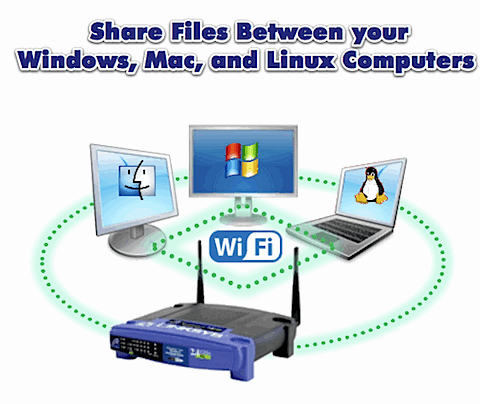
This is the first article in a three part series on Sharing Files Between Any Devices in your Home.
- Part 1 – Share Files Between All of your Computers
- Part 2 – Stream Computer Media to the TV using Video Game Consoles
- Part 3 – Sharing Between your Smartphone and Computer
You Can Get there from Here
Your home has any number of “connected” devices (Computers, Video Game Consoles, Phones, Portable Media Players, Televisionss, DVRs, etc.). Are they all really connected? Here are some simple (and not so simple) steps to get all of your devices singing in harmony.
Sharing Files on your Computers
If you’re like me, the bulk of your media and files sit on one or more computers. You may even have more than one Operating System to further complicate the business of sharing information. Here is how you can share your files between computers runing Windows, Mac, and Linux.
NOTE: This article only addresses sharing files between devices INSIDE of your home network. While connecting to devices on your home network from the outside world (internet) is possible, it will not be covered here.
Sharing the Files on your Computers
IMPORTANT: The following set of instructions shows how to share ALL of the files on your computer. This is not the most secure approach to sharing. You should determine which folders you want to share (for example My Documents or My Music) and perform the following steps at that level.
Sharing Files on a Windows Computer
Windows allows you to share an entire hard drive or select specific folder to share. You can choose the drive or folder to share from Windows Explorer.
Open Windows Explorer (Windows Key + E)
You will see all of your computer’s drives (C, D, etc.)
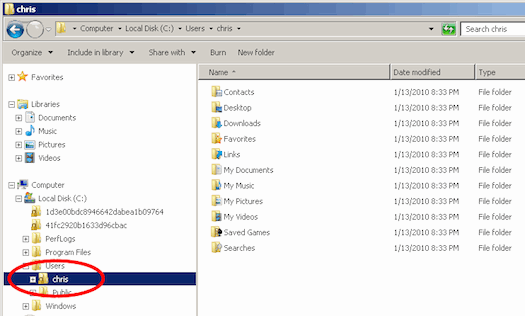
Browse to the entire drive or specific folder that you would like to share.
Right click on the folder that you want to share and select Properties from the options menu.
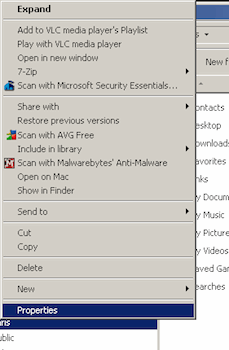
The Properties menu will open.
Go to the Sharing tab
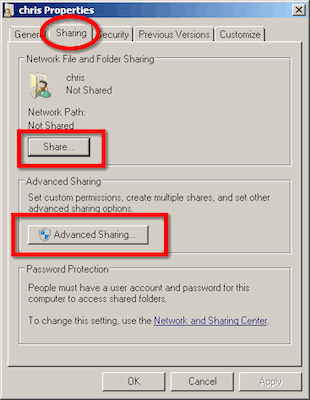
Check the Share button.
Optional: You can also apply finer controls to the sharing priviledges from the Advanced Sharing menu.
Click the OK button to close the Properties menu.
Now, users on your network will be able to access the files on this compter.
Sharing Files on a Mac Computer
You can also share folders with other computers on your Mac computer. You need to go to the System Preferences menu to configure sharing (Applications> System Preferences).
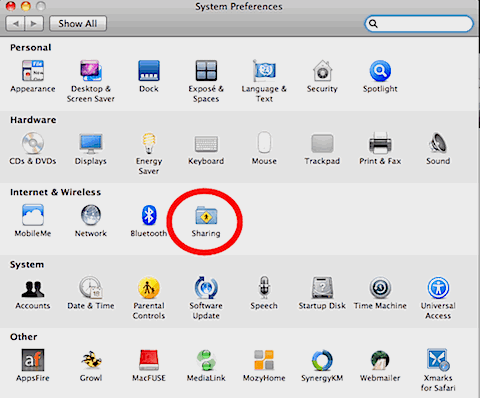
The preferences are grouped by topic on this menu. Click the Sharing icon under the Internet & Wireless heading.
This will open the Sharing panel.
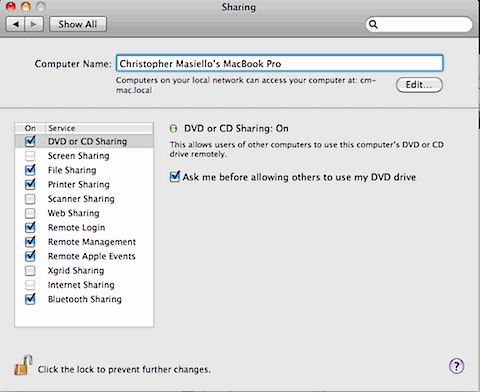
You can share several of your Mac’s resources from here.
Check the resources that you want to share and close this menu.
Now, other computers on your network will be able to this compter.
Sharing Files on a Linux Computer
One of the best and easiest ways to share folders between Linux computers and machines running Windows is using Samba. Samba is a suite of applications for Linux that provides connectivity between Linux and Windows machines. This will allow a Windows machine to interact with it just like another PC.
NOTE: This example uses Ubuntu Linux. If you use a different distro, just Google for the specific instructions.
Start out by installing Samba on your Linux machine. Go to the terminal and type the following command:
sudo apt-get install samba smbfs
Samba is installed now, but you need to configure it so that it is accessible. Run the following command to open Samba’s configuration file (smb.conf):
sudo gedit /etc/samba/smb.conf
Scroll down to this section in the file:
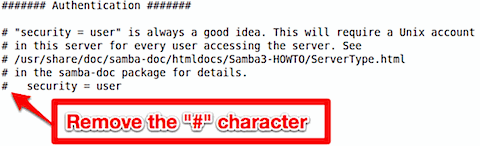
Uncomment the security line (delete the number sign), and add the following line below it, so that it look like this:
security = user
username map = /etc/samba/smbusers
Now, Samba will use the smbusers file to look up the user list.
You need to creat a user that can access the Samba server.
There are two steps to creating a user.
Run the smbpasswd utility to create a samba password for the user. Type the following command (substitute a real user name for “username”):
sudo smbpasswd -a <username>
Next, open up the smbusers file and add that username. Type the followng command:
sudo gedit /etc/samba/smbusers
When the smb users file opens, add the following line, (substitute a real user name for “username”).
<username> = “<username>”
The format is <ubuntuusername> = “<samba username>”.
Telling Samba to Share a Linux Directory
Now you can create Samba shares and give access to the user(s) that you create here.
Reopen Samba’s configuration file (smb.conf) by typing the following command:
sudo gedit /etc/samba/smb.conf
Scroll down to the Share Definitions section of the file, and make it match the following:
#======================= Share Definitions =======
# Un-comment the following (and tweak the other settings below to suit)
# to enable the default home directory shares. This will share each
# user’s home directory as \server\username
[homes]
comment = Home Directories
browseable = yes
# By default, \server\username shares can be connected to by anyone
# with access to the samba server. Un-comment the following parameter
# to make sure that only “username” can connect to \server\username
valid users = %S
# By default, the home directories are exported read-only. Change next
# parameter to ‘yes’ if you want to be able to write to them.
writable = yes
Now Windows machines/users will be able to map a drive on windows using the following share format:
\ubuntumachinename\username
For example, if the Ubuntu machine is named linuxshare, and the username is chris, your share path would be \linuxshare\chris
Connnecting to a Shared Computer
Now that you have the files on all of your machines shared, you need to connect to them from another machine. You can even “map” these shared drives permanently so that they are always available, just like your computer’s Hard Drive or CD/DVD Drive.
Connecting to a Shared Computer from a Windows Computer
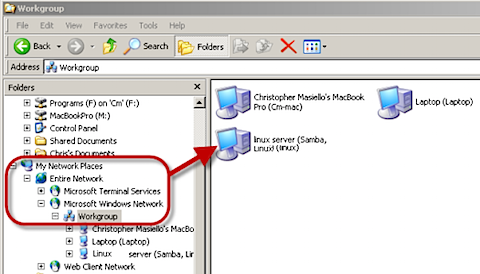
You can locate shared computers on your network from the My Network Places section of Windows Explorer.
Open Windows Explorer (Windows Key + E)
Click the “+” icon to the left of My Network Places in the folders panel. (View> Explorer Bar> Folders)
Click the “+” icon to the left of Entire Network
Click the “+” icon to the left of Microsoft Windows Network
Look for the name of the shared computer/drive Drill down on that compter as if it were a folder on your computer.
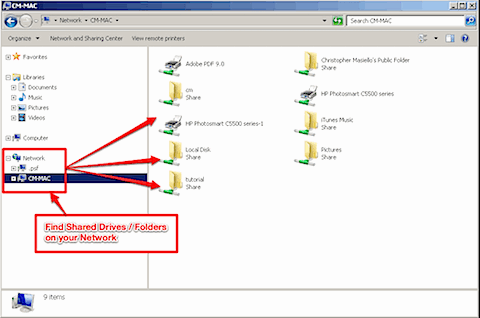
Permanently Mapping to a Shared Drive in Windows
If you want to Window Explorer to remember this shared folder and give it a drive letter (like your C or D drives) you need to “Map” it.
Select Tools> Map Network Drive
Select a letter for this share from the Drive dropdown list
Click the Browse button to the right of the Folder dropdown list
Use the steps above to locate the shared drive/folder that you want to map
Check the Reconnect at Logon box (this will remember the letter/drive mapping)
Click the Finish button
Now, the next time you start the computer the shared folder will appear just like your local hard drive or CD drive with the letter you assigned.
Connecting to a Shared Computer from a Mac Computer
You can locate shared folders on other computers on your network using the Finder application on your Mac. (Applications> Finder)
Click on your Mac, so that you can see the local drives and the Network icon.
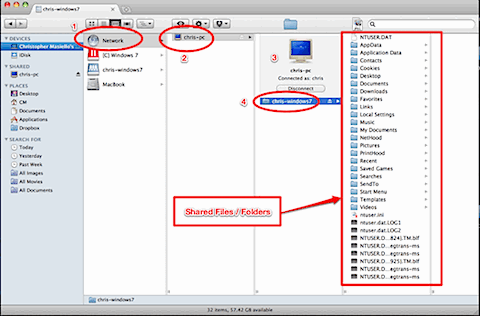
You will see any computers that have shared drives/folders on your network.
Click on the shared machine to access its files.
Permanently Mapping to a Shared Drive in Mac
If you want Finder to remember this shared folder just like the ones on your local machine you need to “Add it to the Sidebar”.
Browse to the shared folder and click File> Add To Sidebar.
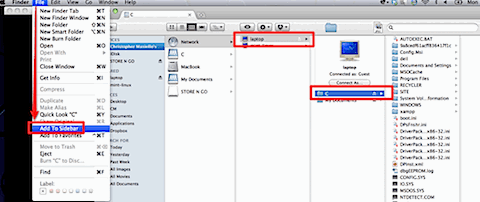
Now it will show up under the Places heading on Finder’s sidebar.
Connecting to a Shared Computer from a Linux Computer
You can locate shared folders on other computers on your network using one of the many file manager applications available in Linux.
NOTE: This example uses Dolphin to navigate Linux’s file system.
Open Dolphin and click the Network icon in the Places panel.
You will see a list of ways to access your Network and the shared folders located on its machines.
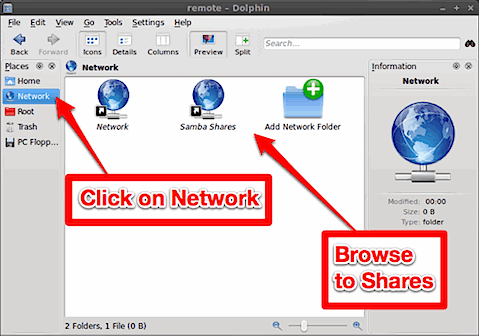
Click Network to locate Linux and Mac machines. Click Samba Shares to locate Windows machines.
Permanently Mapping to a Shared Drive in Linux
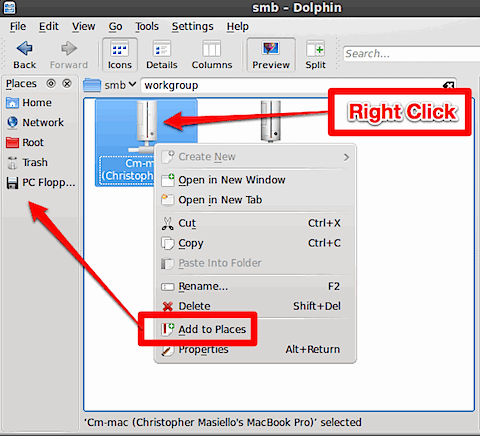
If you want Linux to remember this shared folder just like the ones on your local machine you need to “Add it to the Sidebar”.
Browse to the shared folder and click File> Add To Sidebar.
Video Tutorial – See it in Action
See how to perform each of the steps listed above in this video tutorial
Wanna make sure that you don’t miss anything?
Get free updates from VitaminCM.com
 Subscribe via
 Subscribe via YouTube
Or just  Follow me on Twitter, where I am constantly sharing great articles written by people WAY smarter than me. Or, see some of the other places where you can connect with me out there in the wilds of the internets.

Ultimate Portable Computer Rescue Kit Saves Any Computer
This video tutorial shows how to set up a collection of portable apps on a USB drive that can be used to diagnose and repair almost any broken windows computer.
Add Features to a WordPress Blog with Widgets
Make Your Blog Come to Life When you set up your WordPress blog, you select a Theme to control the look and feel of the site. WordPress themes create a sidebar (or two) on the right and/or left side of your screen. You can add further styling, information, and functionality to your site using Widgets. […]